Embedify features

Run tomorrow’s version against yesterday’s traffic

Embedify replays requests you’ve already processed against your draft. It compares every field and shows exactly what would change, before anything downstream sees it. Testing and debugging are free, and retries of failed events are never billed.
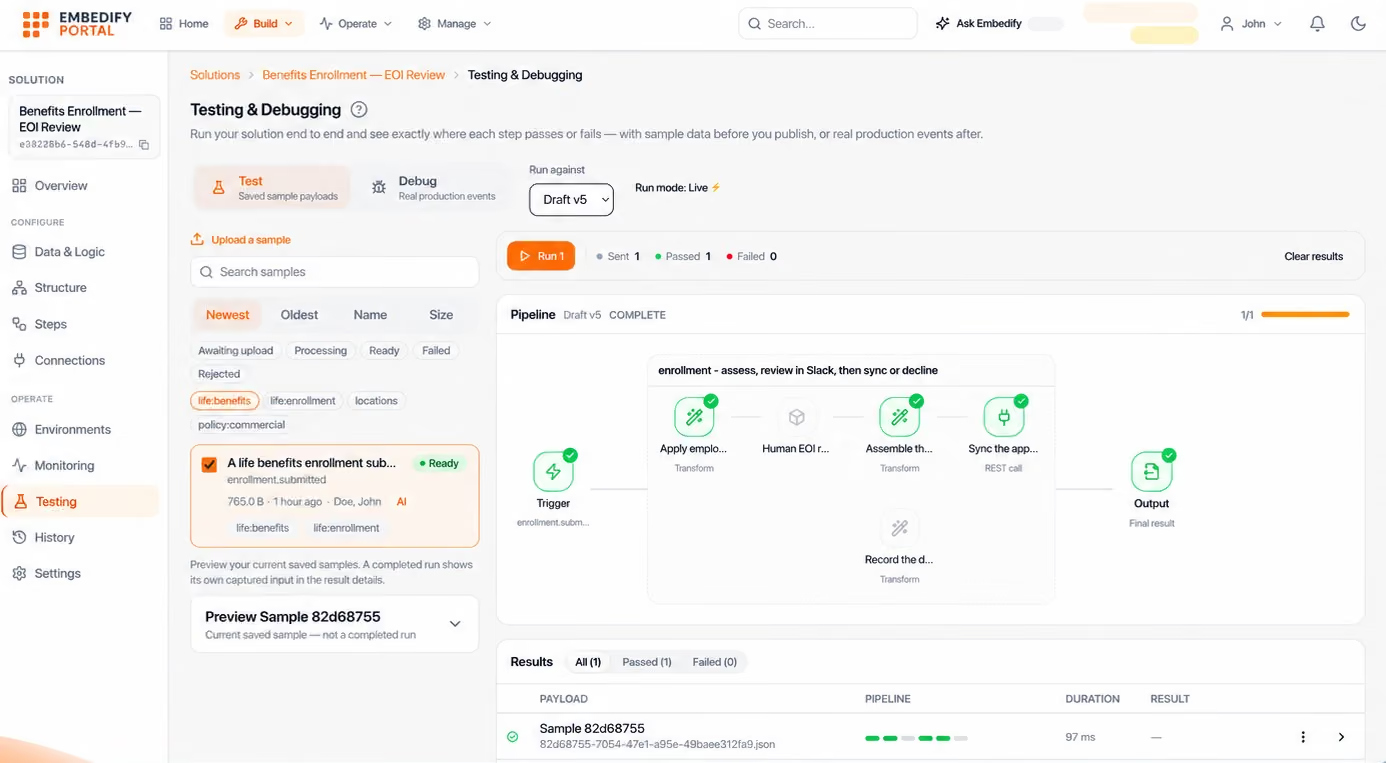
Embedify testing and debugging view running past requests through a draft solution, with each step and its result shown in the pipeline.

At a glance

Embedify features at a glance

Embedify is an integration platform for AI and core systems. Here is what it can do, in numbers.

Items per request

Up to 10,000, each one processed and rolled up by your rules

Throughput

Millions of events per hour

Your own code

Python, R and JavaScript in isolated sandboxes

Environments

As many as you need, promoted with one click

AI

Built-in agents, plus 150+ MCP tools for Claude

Price

$0.005 per request, with everything it sets off included

Only in Embedify

Four things other integration platforms don’t do

Most tools move data from one app to another. These four features are why teams choose Embedify for the hard integrations.

Hierarchical event processing

One request in. Every item inside it processed.

Hierarchical event processing is how Embedify handles records that hold many items, like a policy with 1,000 locations or an order with 1,000 lines. Embedify splits the request into its items and runs your rules, models and data providers on each one. Then it rolls the results back up using your own logic. You pay for one request.

  • ✓Up to 10,000 items per request, per solution
  • ✓Roll-ups follow your business rules, not just totals and averages
  • ✓Several solutions can process the same request at once

1 request

A policy with 1,000 locations

→

Each location scored on its own

→

1 answer

Policy score, rolled up by your rules

Your own models and code

Run your own Python, R and JavaScript

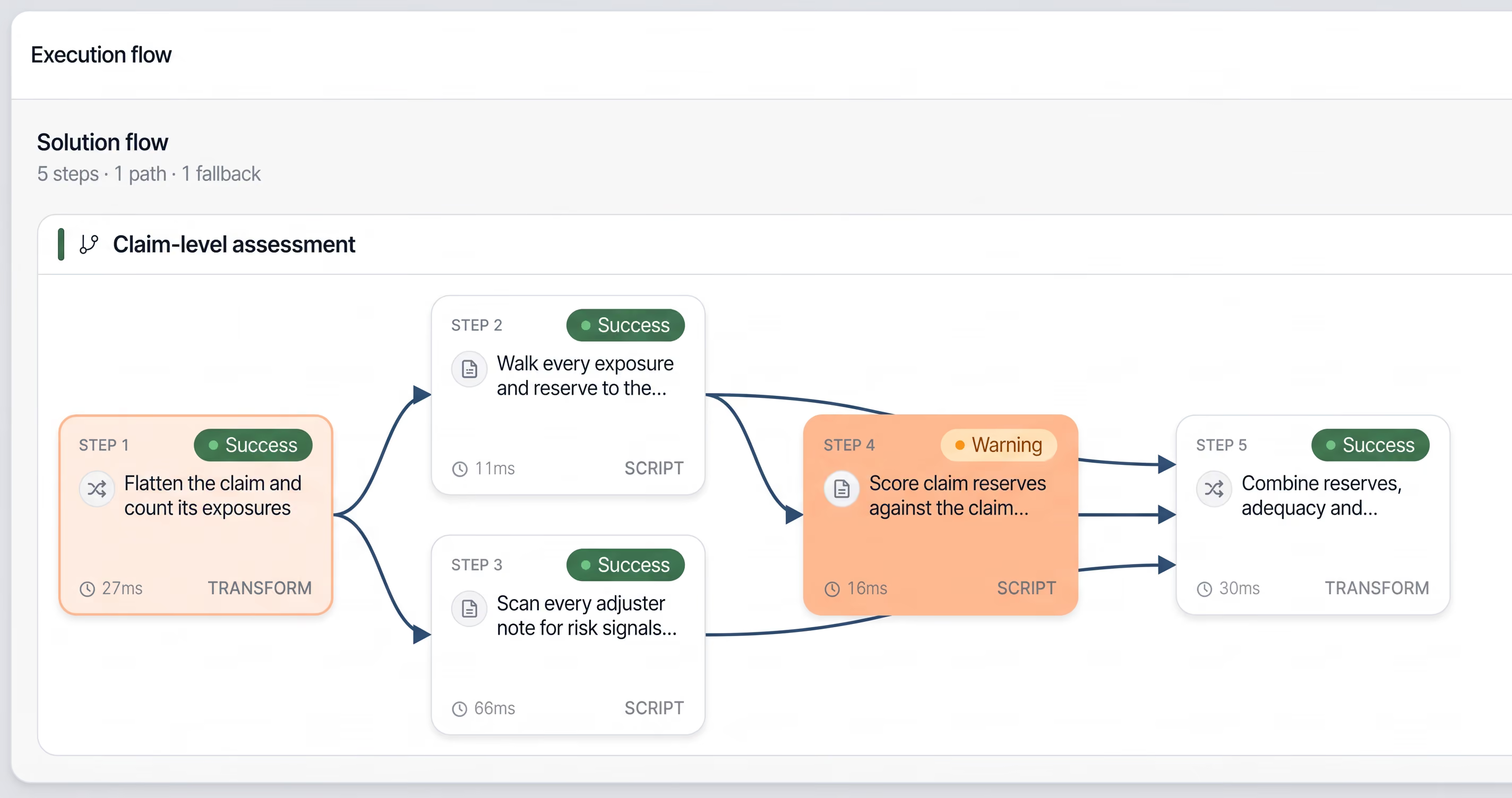
Bring the models your team has already built. Embedify runs Python, R and JavaScript in isolated sandboxes, as one step in any workflow, for minutes or hours. You can also write rules and formulas with no code, and with no outside system connected.
  • ✓Every run gets its own isolated sandbox
  • ✓Map and reshape data with JEXL, JSONPath or JMESPath
  • ✓Write a script once and reuse it across solutions
Embedify execution flow for a claim assessment, with transform steps and script steps that score reserves and check adjuster notes, each with its status and run time.

Embedded screens

Put results inside any app, even old ones

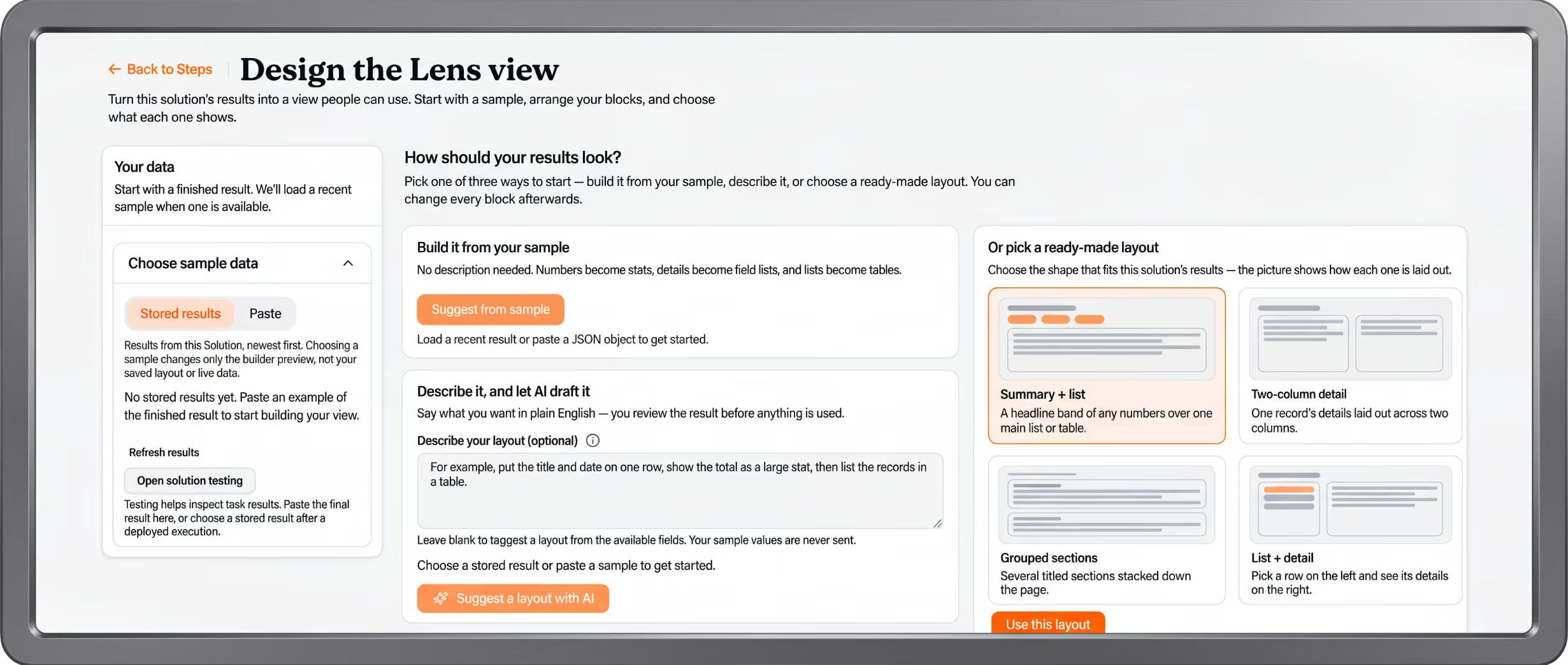
Embedify Lens shows results as screens, widgets and dashboards inside the systems your team already uses, including older ones. Describe the view in plain words, or start from sample data, and the agent drafts it. Lens is optional. You can also send results back through your systems’ APIs.
  • ✓Drill down through as many levels as your data has
  • ✓Each level can use real business logic, not just totals
  • ✓Portal suggests the views to add and shows how to install them
Embedify Lens view designer with three ways to start: build from sample data, describe the layout for the agent to draft, or pick a ready-made layout.

AI agents

AI agents that build with you and ask when unsure

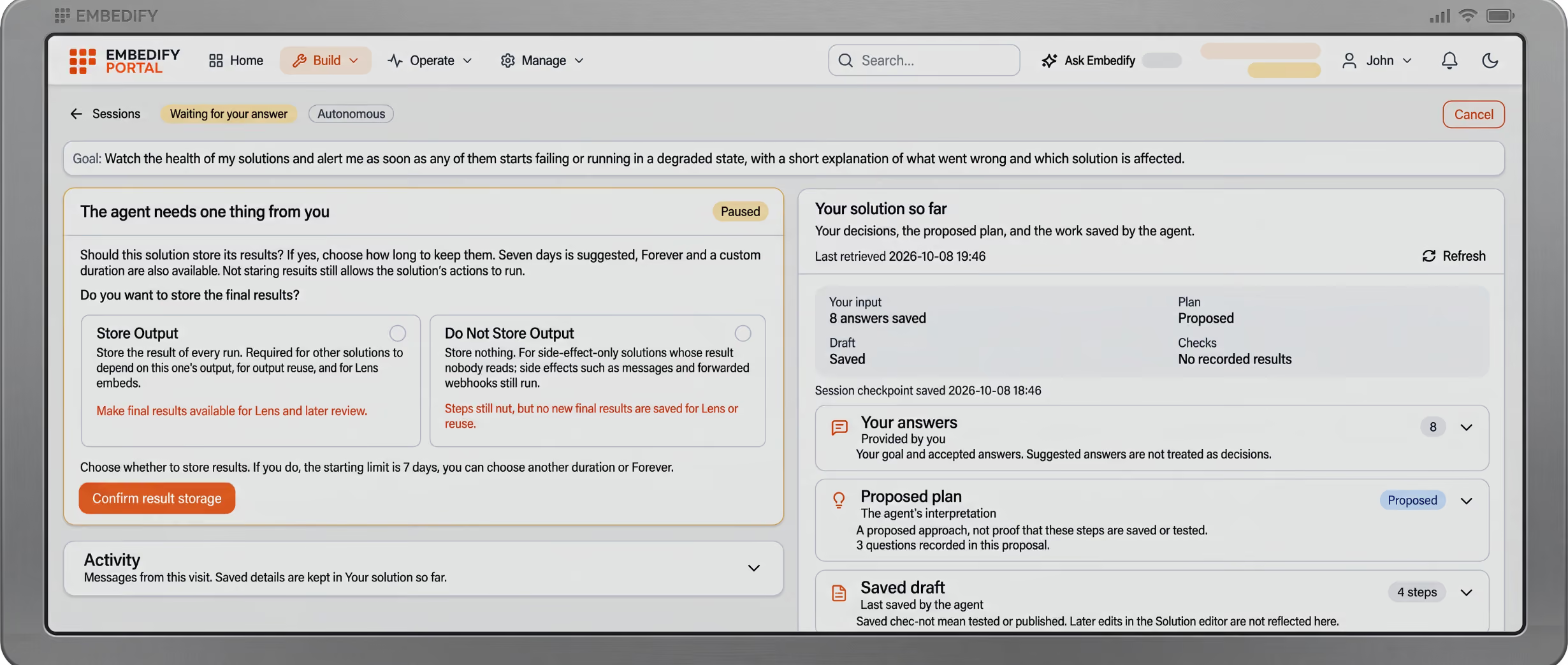
Describe what you need. The integration agent plans it against your real connections, asks when something is unclear, and drafts the solution. In production, operations agents watch every solution, explain failures and propose fixes. A person always approves the fix.
  • ✓Agents ask instead of guessing
  • ✓Built-in agents are included in the price
  • ✓Connect Claude to build, test and run solutions, even from your phone
Embedify integration agent asking a clarifying question while planning a solution, with the proposed plan and saved draft shown alongside.

Full feature list

Every Embedify feature, by area

Eight areas cover the whole life of an integration, from the first connection to running it in production.

01

Connect

Connect to almost any system, with or without an API.

  • Connection catalog. Ready-made connections and connection families, with more added all the time.
  • OpenAPI import. Create a connection to any API from its OpenAPI description.
  • REST, Kafka and polling. Call APIs, read Kafka topics, or check for new data on a schedule.
  • Agent and SDK. Connect older systems with no API by installing the Embedify agent on them.
  • Templates. Start from a ready-made integration or workflow, add your credentials and go.
  • Push or poll. Let systems send events to Embedify, or have Embedify fetch them.

02

Process and orchestrate

Turn each request into exactly the work it needs.

  • Step-by-step workflows. Build each solution as steps that run in order or side by side.
  • Conditional paths. Run every matching path, only one, or the first match, based on the data.
  • Hierarchical event processing. Split a request into up to 10,000 items and roll the results back up.
  • Retries and fallbacks. Set retry and fallback rules for each step.
  • Callbacks. Wait for a slow system to call back, then carry on.
  • Many solutions, one request. Several solutions can act on the same request.

03

Rules, formulas and code

Add your own logic, with or without code.

  • Rules and formulas. Define business rules and formulas, like pricing rules, with no system connected.
  • Python, R and JavaScript. Run your own code and models in isolated sandboxes, for minutes or hours.
  • Mapping languages. Map and reshape data with JEXL, JSONPath and JMESPath.
  • Expression help. Describe what you need, and get the expression written and explained.
  • Shared scripts. Write a script once and reuse it across solutions.

04

AI agents

AI that builds and runs integrations with you, and asks before it guesses.

  • Integration agent. Describe what you need. It plans, asks questions and drafts the solution.
  • Operations agents. They watch every solution, find the cause of failures and propose fixes for a person to approve.
  • Learns from your setup. Embedify learns from past connections and errors to suggest better mappings and spot known problems fast.
  • Any AI model. Call any AI model or agent from a workflow through its API.
  • Claude through MCP. Connect Claude to build, test and run solutions with 150+ tools.
  • AI included. Built-in agents are part of the price, not an add-on.

05

Embed results

Show results where people already work. Optional.

  • Embedify Lens. Screens, widgets and dashboards that run inside your existing apps.
  • Build from a description. Describe a view, or start from sample data, and the agent drafts it.
  • Many levels. Drill down from a summary to every item, with business logic at each level.
  • Visual editing. Change fields, layout and styling without code.
  • Guided install. Portal suggests which views to add and shows how to install them.
  • Or write back. Send results to your systems through their APIs instead.
See where Lens fits in Portal →

06

Test and deploy

Prove it works before anyone depends on it.

  • Replay and compare. Run past requests through a draft and see every field that would change.
  • Scenario testing. Save sample events and test every step visually.
  • Batch tests. Run many samples at once and check every result.
  • Validation. Publishing is blocked until every error is fixed, and Embedify tells you what’s missing.
  • Versions. Compare versions and roll back in one step.
  • One-click promotion. Move a solution through UAT, pre-production and production, with its own connections in each.
See how a solution goes live →

07

Operate and monitor

See every request, and fix problems fast.

  • Request trace. Follow any request through every step, with timing and results.
  • Health checks. Operations agents keep checking the health of every solution.
  • Alerts. Get alerts in Slack, by email or by SMS, on success, failure or any condition you set.
  • Approvals in Slack. A workflow can pause until a person approves, denies or picks an option in Slack.
  • Retry in place. Fix a failed event and rerun it where it failed, free of charge.
  • Spend control. See spend so far and the predicted bill, with soft and hard limits you set.

08

Govern and secure

Control who does what, and where your data lives.

  • Account isolation. Every account is isolated, and customer data is never shared.
  • Encryption. Credentials are encrypted before they are stored.
  • Six roles. Viewer, Editor, Publisher, Support, Manager and Admin.
  • Multi-factor sign-in. Protect every user with MFA.
  • Audit trail. Every request leaves a step-by-step record you can follow.
  • Data region. Choose where your data is stored, or ask for dedicated infrastructure.
Read Security & Trust →

Specifications

Limits and specifications

The numbers and options behind every Embedify account.

FeatureDetail
Items per requestUp to 10,000 per solution. Several solutions can process the same request.
ThroughputMillions of events per hour.
Ways to connectREST APIs, Kafka topics, scheduled polling, OpenAPI import, and the Embedify agent and SDK for systems with no API.
Code and scriptingPython, R and JavaScript in isolated sandboxes. JEXL, JSONPath and JMESPath for mapping.
Workflow pathsEvery match, one match, or first match. Retry and fallback rules for each step.
EnvironmentsNo limit. Promote between them with one click.
AIBuilt-in integration and operations agents, included in the price. 150+ MCP tools for Claude. Any AI model through its API.
AlertsSlack, email and SMS. Approvals and choices in Slack.
User rolesViewer, Editor, Publisher, Support, Manager and Admin.
Sign-inMulti-factor authentication. Single sign-on is not available yet.
Data residencyChoose the region where your data is stored. Dedicated infrastructure on request.
Pricing$0.005 per incoming request, with everything it sets off included. Testing, debugging and retries of failed events are free.
Free trial30 days or 50,000 requests, whichever comes first. No card needed.

Quick answers

Can Embedify do this?

Short answers to common feature questions. The FAQ page has more.

Can I see what a change will do before it goes live?

Yes. Embedify replays past requests through your draft and shows every field that would change. Testing is free.

Can one request start several solutions?

Yes. Several solutions can process the same request, each with up to 10,000 items. The trace shows which ran, which were skipped and why.

Can a workflow take different paths depending on the data?

Yes. A solution can have many paths. You choose whether every matching path runs, only one, or the first match.

What happens when one step fails?

Each step has its own retry and fallback rules. If it still fails, operations agents explain why and propose a fix. A person applies it and reruns the event in place, free of charge.

Can I use different connections in test and production?

Yes. Deploy once to run the same everywhere, or deploy separately for each app and stage, each with its own data and connections.

Can I undo a change?

Yes. Every solution is versioned. Compare any two versions and roll back in one step.